A Brazilian funk tracker for the M-VAVE FM-1. This manual goes from the first button to a whole baile. Every
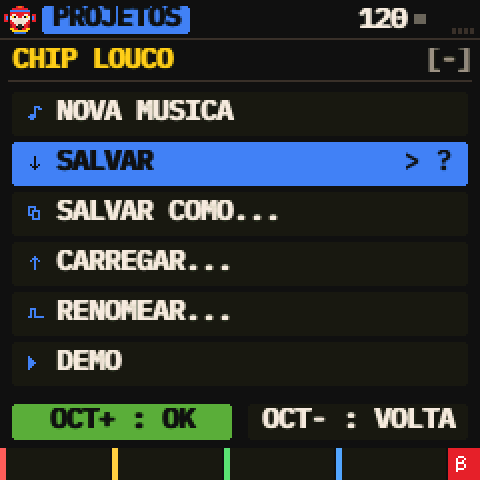
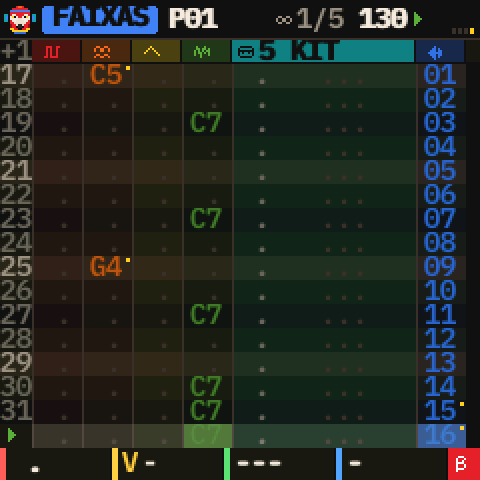
screen here is the firmware's own, in the simulator. The pictures show the screen in Portuguese, BAILE's first
language; switch the FM-1 to English in OPTIONS (GLO three times, KNOB 2) and the names below are what you see.
At power-on the mosaic lights up from the middle out. Press any key. The FM-1 starts on an empty
song: press REC, play the keys, press PLAY. To hear a demo: SAVE,
go down to DEMO with SELECT, OCT+ (once more if it asks about the unsaved song), PLAY.
Hold HOME on any page for its help. A yellow bar fills at the bottom of the screen when holding a
button is about to open something (HELP, LIVE, TOOLS).
2. The buttons
Button
What it does
HOME
The tracks. Held: the help of the page. HOME + PLAY: panic, everything stops.
SEQ
The step grid. OCT− / OCT+: 16, 32 or 64 steps.
EDIT
The track's sound: SOUND, SOUND 2, (FM operators / sample edit), EFFECT, TABLE. Again: the next page.
LFO
The LFO, then MODULATION.
ENV
The ENVELOPE, then MIX (levels, pan, sends, master).
FX
SENDS (drive, echo, reverb and DUCK per track: with DUCK, KNOB 4, the track steps back when the kick hits, key 1 or 2 of a kit), LIVE, FILTER, FX SEQ. Held: LIVE while you hold it.
SCL
The SCALE, then MAGIC, then back.
GLO
The SONG (the chain), the GROOVE, the OPTIONS (theme, language, MIDI clock, font, metronome).
SAVE
PROJECTS (it blinks while there are unsaved changes). Held: the tools. OCT− / OCT+ while held: undo / redo.
PLAY, REC
Play and stop; record (the keys write at the cursor, or on the beat while it plays).
ARP
Not an arpeggiator: the clear and shift key. A tap clears the cell. Held: + SELECT inserts or removes a row, + KNOB 3 / 4 the cell's second effect, + PRESETS the track's engine.
Encoder
What it does
SELECT
The row; on the EDIT, LFO, ENV, FX and GLO pages, the page.
ALGORITHM
The track. On SONG the entry, on GROOVE the step.
PRESETS
The factory sound (on the first SOUND page), or the pattern on the others.
KNOB 1–4
The bottom line of the screen says what each does: 1 red, 2 yellow, 3 green, 4 blue.
3. Tracks, cells and patterns
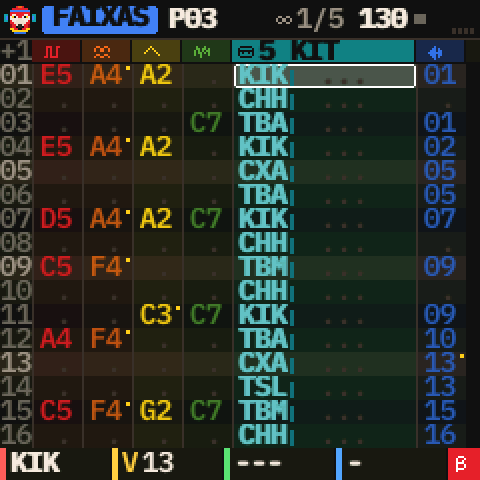
On TRACKS time runs down: each row is a 16th, each column a track. The cursor's track is wide and
shows the note, the volume and the effect. The tracks' colours go from red to blue, as the macaw's feathers do.
Each cell holds a note, a volume and up to two effects: ARP (a chord), GLI (glide), VIB, ROL (roll), BND,
CHN (chance), DLY (delay), CUT, REV (reverse), PIT (pitch), HOP (to a row), END (ends the pattern)… KNOB 3 and 4
choose the effect and its value; with ARP held, the second effect.
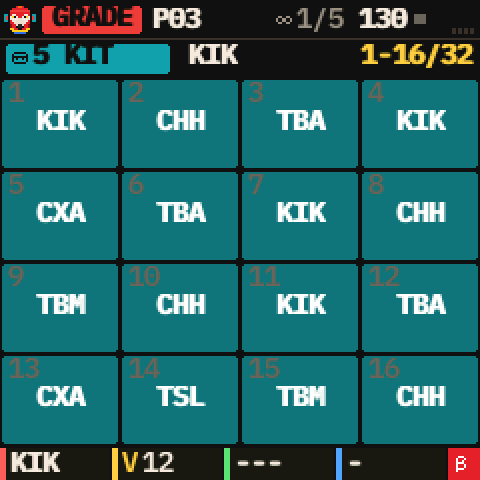
On the GRID (SEQ) the track's 16 steps sit on the 16 white keys: tap to turn them on
and off. On a kit track each step shows its drum. OCT+ takes the pattern to 32 and 64 steps.
4. The sounds
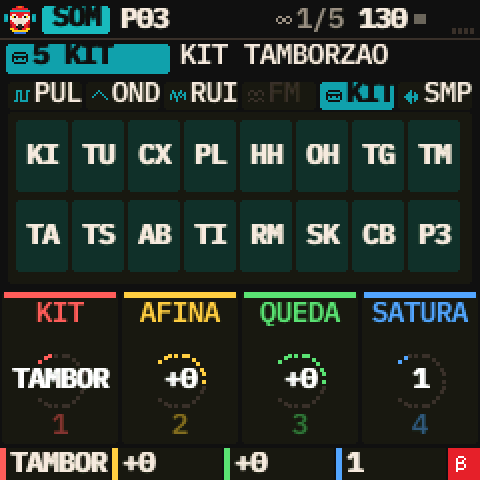
Each track has an engine: PULSE, WAVE, NOISE, FM (6 operators, one track only), KIT or SAMPLE. On the first
EDIT page, PRESETS picks the factory sound; ARP held +
PRESETS changes the engine.
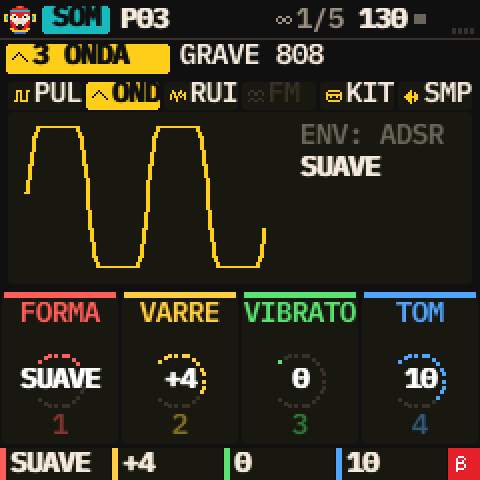
808 BASS (the WAVE engine): an attack that punches (SWEEP) and a glide (the GLI effect in the cell,
or the sound's GLIDE). Other basses: BENT 808 (driven, for mandelão) and SUB. A new project starts with the 808.
BAILE's sounds
What for
808 BASS
Funk's bass, with punch and glide.
BENT 808
A sawtooth 808, crushed: mandelão.
SUB
Only the sub, round.
MELODY LEAD
Funk melody's lead, with vibrato and glide.
MELODY PIANO
A bright FM piano, for the chords (the ARP effect plays a chord from one note).
STAB
A short brass stab.
SIREN
A siren on the PULSE engine: hold the note.
The breaks
A SAMPLE track plays a break cut in 16 slices, one a key: TAMBORZAO, VOLT, FUNK 150,
MANDELAO, BREGA FUNK and MONTAGEM (a different sound every 16th, to cut up). All synthesised, none
taken from a record. Your own sounds go into MY 1 to 4 with the importer.
5. The 8 kits
On a KIT track the 16 white keys are 16 drums. In every kit key 1 is the kick, 2 a second kick,
3 the snare, 5 and 6 the closed and open hat: a beat stands up when you change kits. The knobs:
KIT, TUNE, DECAY, DRIVE.
Kit
The drums that make it
VOLT
Miami bass's 808: kick, a long BOOM, snare and clap, cowbell, clave, conga, maracas, an orchestra stab.
TAMBOR
The tamborzão: a dry kick, the TUM, a dry snare, palms, atabaques low, middle, high, slap and muted, a snare shot.
150
Short and hard: a dry kick, a distorted PUNCH, a cracking snare, metal, a zap, a snare roll.
MANDELA
Blown out: a driven kick, a sub, anvils, the BRUXARIA (a noise that swells), a sweep, crackle, glitch, laser.
BREGA
A dry kick and a round one, doubled palms, low and high timbales, cowbell, tambourine.
MELODY
The clean drum machine of the 2000s: ride, crash, clave, bell.
TUIN
The baile's effects: two sirens, a whistle, the falling TUIN, laser, shot, explosion, vinyl, scratch, the noise that RISES.
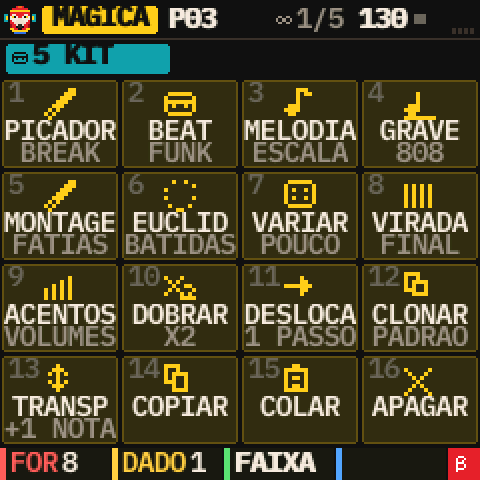
SCL twice. Each white key is a tool that writes into the pattern; KNOB 1 is the
strength, KNOB 3 chooses the track or the whole pattern. Each one is an undo step.
Tool
What it does
BEAT FUNK
On a kit track, writes that kit's funk (the tamborzão on TAMBOR, the anvil off the beat on MANDELA, doubled palms on BREGA…). Strength adds percussion, hats, ghosts and a roll at the end.
BASS 808
The bassline in funk's 3-3-2, mostly on the root, with octave jumps and glides.
CHOPPER
Chops the break: kicks on the beats, the snare on 2 and 4, the rest shuffled.
MONTAGE
The montagem: 2 to 4 pieces of the break (or of the kit) repeating in groups, some reversed or pitched.
FILL
Rolls at the ends of the beats and, on a kit, a snare fill that speeds up at the end of the bar.
MELODY, EUCLID, VARY, ACCENTS
A melody in the scale, a Euclidean rhythm, variations, accents.
DOUBLE, SHIFT, CLONE, TRANSP
Doubles the pattern, shifts it a step, clones it into the song, transposes.
COPY, PASTE, CLEAR
The track or the whole pattern.
7. The groove
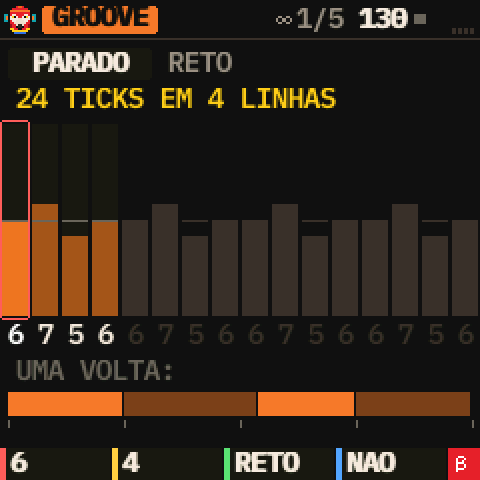
GLO twice. Each step lasts a number of ticks (6 is a straight 16th). KNOB 3
picks a preset, KNOB 4 turns it on and off.
Preset
Ticks
The feel
STRAIGHT
6 6
no swing
TAMBOR
6 7 5 6
the tamborzão's late second 16th
BREGA
7 5
brega funk's swing
150
6 5 7 6
pushes the second
MANDELA
7 5 6 6
dragging
TRIPLET
4 4 4
triplets
8. Live effects
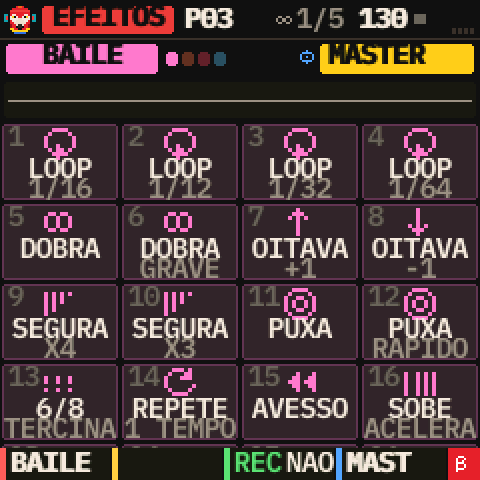
Hold FX and play the white keys: the effect plays while the key is down. There are 64 in
four banks (OCT− / OCT+): BAILE, PAREDAO, DESTROY and
BEAT. KNOB 4 picks the target (the master or a track); with REC, the effect is recorded into the pattern.
STUTTER repeats a sliver (x3, x4) · SCRATCH · BUILDUP the roll that speeds up · REVERSE · LOOP 1/16 to 1/64.
GATE cuts the sound in rhythm · LOWPASS / HIPASS sweep · TAPE STOP · DIVE · FREEZE.
BASS+ thickens the lows and adds the harmonics that carry an 808 on a small speaker · ECHO the dotted-8th echo · SIREN a siren over everything · NO MELODY, NO BEAT.
9. The song and the projects
GLO opens the SONG: a list of patterns, each played N times. A white key picks the pattern,
KNOB 3 the times, OCT+ adds, OCT− removes. ARP switches LOOP (the
pattern on the screen again and again) and SONG (the list).
SAVE opens the PROJECTS: new song, save, save as, load, rename and the DEMO.
OCT+ confirms, OCT− goes back. There is a DEMO for each style: each time you load
it, the next one comes: BAILE (tamborzão, 130), VOLT (Miami bass, 128), MANDELAO (F Phrygian, 130) and
BREGA FUNK (150, with the BREGA groove). The song also saves itself, and there are three project slots. BAILE
does not read any other firmware's projects.
10. A first tamborzão
In a new project (SAVE, NEW SONG), track 5 is already the TAMBORZAO KIT and track 3 the 808 BASS.
Go to track 5 (ALGORITHM), open MAGIC (SCL twice) and tap BEAT FUNK (key 2). Turn KNOB 1 up for more and tap it again.
Track 3: tap BASS 808 (key 4). The bass comes on the kick's beat.
Open the GROOVE (GLO twice), pick TAMBOR with KNOB 3 and turn it on with KNOB 4.
PLAY. Hold FX and play STUTTER, SCRATCH, SIREN.
On track 5, tap FILL to end the bar. Like it? SAVE, SAVE, OCT+.
The demo playing: the green cursor on the row that sounds.
11. Help and safety
BAILE is a beta (0.3): installed on a real FM-1, with its test list still open. It is an unofficial firmware: install it at your own risk.
Install: from the hub (Chrome, Edge, Opera), with a USB data cable and every other MIDI program closed. Do not unplug during the write; if it is cut, plug the FM-1 back in and click again: it resumes.
Rescue: if BAILE fails to start twice in a row, the FM-1 opens the USB rescue by itself (or hold OCT− while switching on). Then run the installer again.
Silence? BAILE starts on an empty song: write notes (REC and the keys) or load a DEMO.
PRESETS does not change the sound? You edited it (*): the next one is shown in gold, OCT+ loads it.
A mistake: hold SAVE and press OCT− (undo).
The click in your recording: the metronome goes into the USB audio too; turn it off in OPTIONS.
Back to the official firmware: M-VAVE's M-UPGRADE, firmware V15. BAILE's projects are lost. The steps.
 BAILE